Introducing Recovery Match for Microsoft Entra ID Account Recovery

Plug-and-play account validation for Microsoft Entra ID account recovery.
Live today on Microsoft Marketplace.
When someone loses every way to sign in, Microsoft Entra ID account recovery lets them verify their identity and get back in on their own. Before access is restored, one question needs an answer: is this verified person the owner of the account?
Microsoft recommends adding a validation step to answer it, and its documented path is to build and host your own. IdRamp Recovery Match, launching today, makes it plug and play, with no code to write or host.
Why name matching isn't enough for account recovery
Identity verification with a government ID and a live selfie proves someone is real. It doesn't prove they own the account they're asking for.
Out of the box, Entra ID account recovery links the two on first and last name alone. Microsoft's own documentation says name-only matching may not give enough assurance for high-risk accounts (Microsoft Learn). It also notes that when two people share a name, recovery may be blocked for one of them (Microsoft Learn FAQ).
Recovery Match goes beyond the name, matching against the records your organization already trusts.
How Recovery Match works
After a user verifies their identity, Microsoft Entra ID passes the verified name, date of birth and other details to Recovery Match, which checks them against the user's Entra ID account and any HR system you connect, using your matching rules. It answers pass or fail inside Entra ID's time limit, with a reason code for every failure, and Entra ID continues or stops the recovery on that answer.
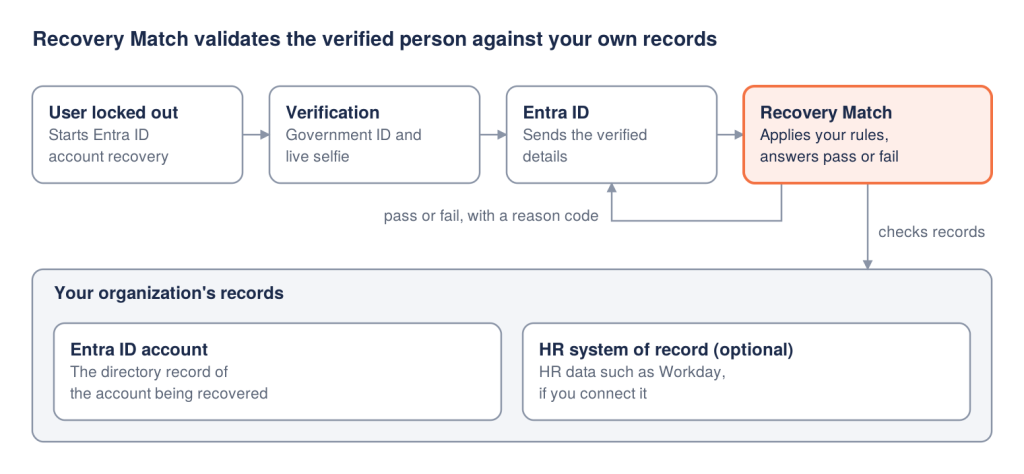
Your identity verification provider proves who the person is. Recovery Match validates that they are the right person for the account. Users recover the same way they do today.
Key capabilities
- Ready on day one. The default profile works with no setup. It allows small first-name spelling differences, such as Jon and John, and requires an exact last name.
- Rules you control. Match on name, date of birth, employee ID or email, against Entra ID and HR data such as Workday, as strictly as you need.
- Replaces the name-only check. Recovery Match can make the decision on its own, in place of Entra ID's built-in first and last name comparison.
- Any identity verification provider. Works with whichever provider you use on Microsoft Security Store.
- Fails closed. An error, a timeout or a setup problem never lets a recovery through.
- Privacy by design. The ID photo is never sent for matching, and names, dates of birth and other verified details are never logged.
- No access to your tenant. IdRamp's app can receive Entra ID's calls but can't read or change anything in your tenant.
Getting started
- Subscribe on Microsoft Marketplace. Billing runs with your other Marketplace purchases.
- Pick your matching rules in the IdRamp Partner Portal. Use the default profile as is, or build a stricter rule in a guided setup.
- Connect an HR system (optional). Link HR data such as Workday so each recovery is also checked against your system of record.
- Turn it on in Entra ID. In the Microsoft Entra admin center, add Recovery Match as the custom authentication extension for account recovery. Pilot it with a test group, then roll it out.
Frequently asked questions
Does Recovery Match verify identity?
No. Your identity verification provider does that. Recovery Match validates that the verified person is the right person for the account.
Do I need an HR system?
No. The default profile matches against the Entra ID account alone. Connecting an HR system such as Workday is optional.
Which identity verification providers work with it?
Any provider you use for Entra ID account recovery through Microsoft Security Store.
Does IdRamp get access to my tenant?
No. IdRamp's app can receive Entra ID's calls but can't read or change anything in your tenant.
Available today
Recovery Match is live on Microsoft Marketplace. You pay per account recovery decision, with no monthly fee, and volume pricing is available through private offers. All you need is Microsoft Entra ID P1 with account recovery turned on and an identity verification provider from Microsoft Security Store.